Lower waste. Lower food costs.
Less over-prep means less money in the bin.
FOR THE KITCHEN. BEFORE THE RUSH.
Stop binning food. Start protecting your margin.
Too much prep eats into profit. Too little takes dishes off the menu. Ember turns your sales reports into a daily prep plan to help cut waste, keep food fresh and have dishes ready when customers order.
No new till system. No obligation. No prep for the demo.
ONBOARDINGUsually
| Prep line | Build to | We have | Prepare |
|---|---|---|---|
| Chicken burgers1 item / pack | 134 | 23 | 111 |
| House sauce1 litre / pack | 15 | 10 | 5 |
| Rice portions10 portions / pack | 3 | 2 | 1 |
Less over-prep means less money in the bin.
Plan around demand and your shelf lives.
Be ready for orders before the rush arrives.
BETTER PREP SHOULD HELP YOUR PROFIT
Wasted ingredients cost money. Tired food can cost repeat visits. Sold-out dishes can cost orders. Better planning helps you tackle all three.
01 / REDUCE WASTE
Every portion thrown away carries an ingredient cost and prep time. Ember uses your forecast, shelf lives and usable stock to help your team prepare what’s needed, without making another batch you already have.
LESS OVER-PREP. LESS MONEY WASTED.02 / SUPPORT FOOD QUALITY
Prepping closer to demand helps reduce food sitting around before it’s served. Fresher dishes and more consistent quality give customers a reason to order again, recommend you and come back.
FRESHER PREP. A BETTER EXPERIENCE.03 / PROTECT SALES
A dish you can’t serve is a sale you may lose. Plan for bookings, busy days and expected demand so your team can have the right quantities ready, with fewer last-minute sold-outs.
FEWER SOLD-OUTS. MORE CHANCES TO SELL.FROM REPORT TO READY
Stop translating yesterday’s numbers into today’s decisions by hand. Give your team one practical plan.
We map your existing reports to your menu and preparation lines. You keep the till system you already use.
YOUR EXISTING REPORTSAdjust the forecast for bookings, events and busy days. Your configured shelf lives and pack sizes shape the build-to quantities.
YOUR KITCHEN’S RULESEnter the usable stock you already have. The daily sheet shows the remaining packs to prepare, ready for your team to follow.
ONE CLEAR DAILY SHEETA LITTLE LESS MENTAL MATHS
Here’s the answer your team needs. Change the usable stock below and watch the prep quantity update.
Illustrative calculation. Your live build-to targets depend on your sales forecast, configured shelf lives and pack sizes.
1 item per pack · example build-to target
134 packs needed − 23 usable = 111 to prepare.
Show me the planner in a demoTHE ACTUAL PLANNER
From the weekly forecast to the sheet on the pass. See the real screens your managers and kitchen team will use.
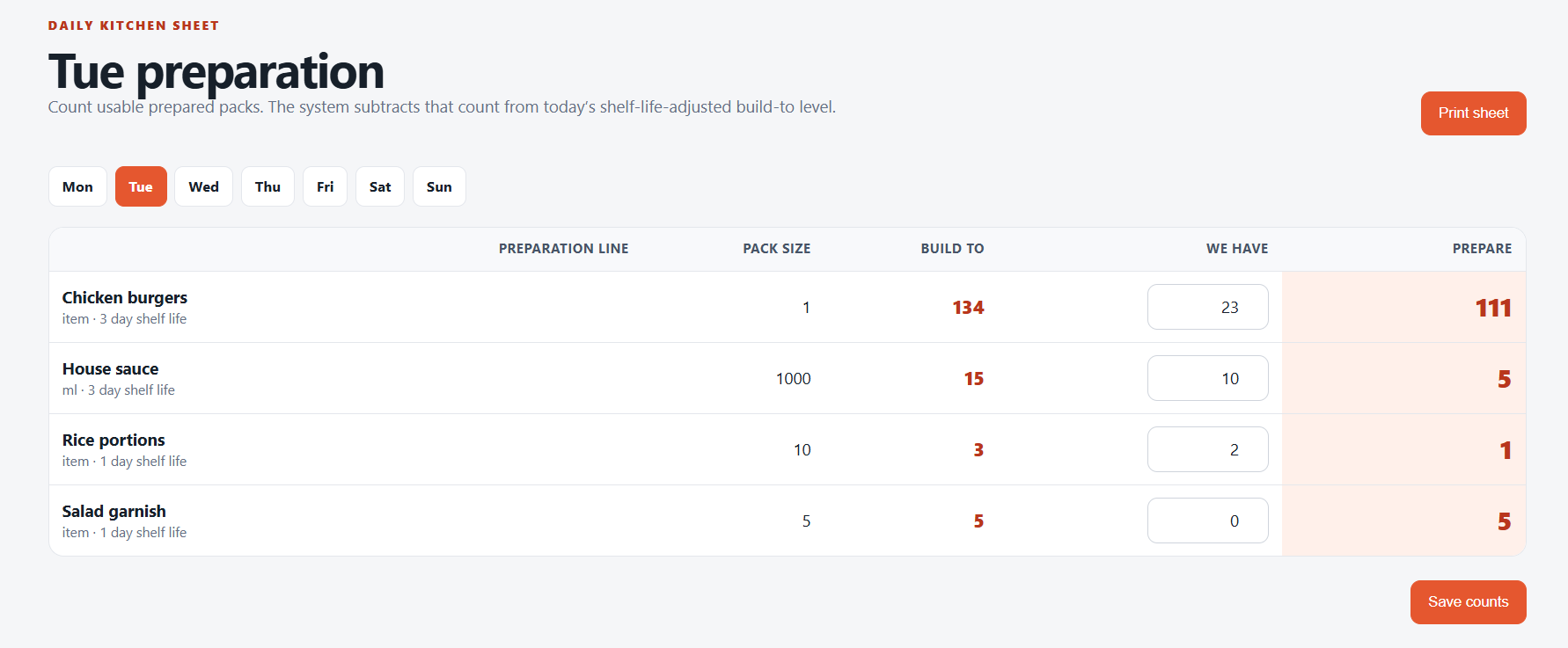
The answer at a glance. Count usable packs. Read what to prepare. Print the sheet.
Open full size (new tab)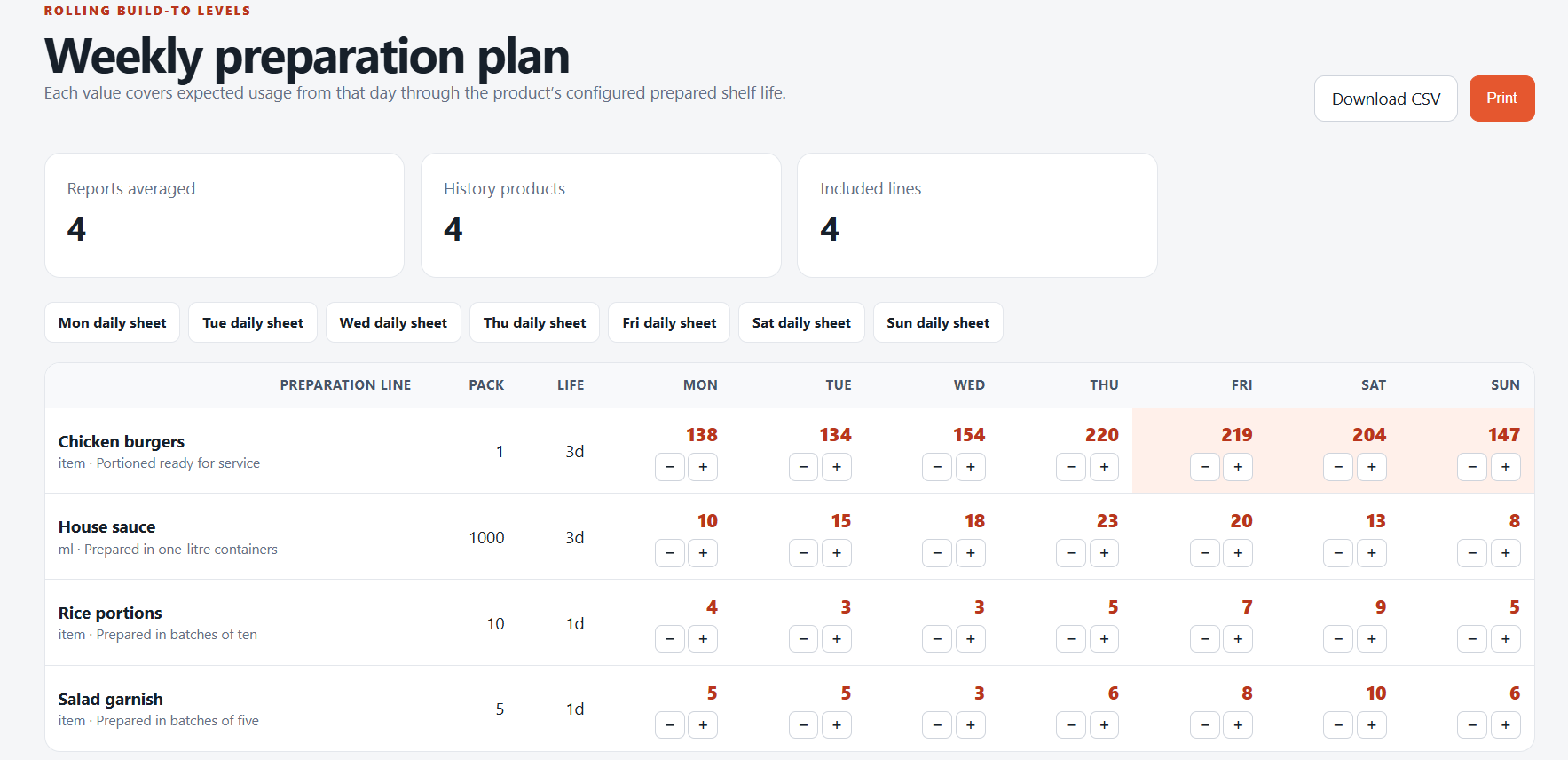
See the week taking shape. Review demand and build-to levels across your preparation lines.
Open full size (new tab)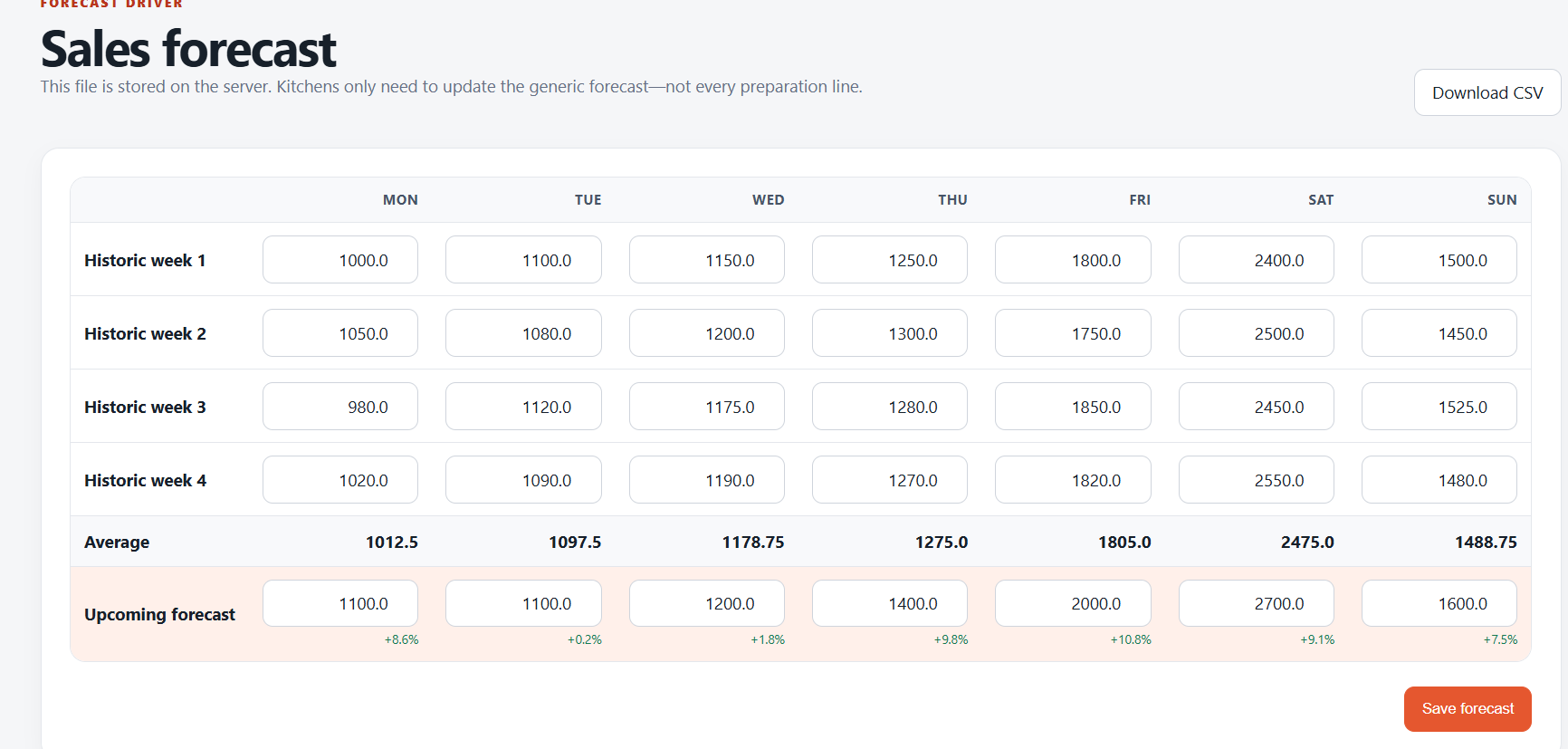
Local knowledge belongs in the plan. Adjust the forecast for what your managers know is coming.
Open full size (new tab)Real product screenshots with example data. Tap any screen to inspect it at full size.
FITTED TO YOUR OPERATION
Ember is configured around the way your kitchen works, with your preparation lines, pack sizes, shelf lives and reports.
Built from real kitchen experience.
Created by someone who has managed forecasting, availability and food preparation in operating kitchens.
The food you actually make.
Your agreed rules, built into the plan.
Visible calculations. Manager-adjustable forecasts.
TWO WAYS TO RUN YOUR PLANNER
Both plans start with a system configured around your kitchen. Choose who looks after new dishes, forecasting and ongoing system updates.
Includes configuration, report mapping and manager onboarding.
Sign up for at least one paid month to qualify. Your chosen monthly subscription remains payable.
View offer termsFor teams who want to run their own planner.
Start with a free Kitchen Planner demo.
No obligation to subscribe when you enquire.
For teams who want Ember to make their updates.
The two-business-day turnaround starts when the completed form includes all the information needed for the update.
Start with a free Kitchen Planner demo.
No obligation to subscribe when you enquire.
Free onboarding: The usual £300 onboarding charge is waived when you sign up for at least one paid month of either Kitchen Planner plan: £125/month self-managed or £200/month Ember-managed. The saving applies to onboarding; the monthly subscription remains payable. Requesting a free demo does not start a subscription.
Self-managed: After initial setup and onboarding, your team manages new dishes, forecasting and ongoing changes to the system.
Ember-managed: Update requests must be submitted using the forms Ember provides. For a new dish, supply the requested quantities, preparation details and corresponding report names. Ember completes updates within two business days of receiving a completed form containing all required information. Requests made outside these forms do not qualify for the managed-update service.
We’ll confirm your operation’s scope and subscription terms before setup.
A FEW THINGS YOU MIGHT ASK
Start with a conversation about your kitchen.
Ask the Ember teamWith self-managed at £125/month, we set up the planner and onboard your team. You then manage new dishes, forecasting and ongoing system changes. With Ember-managed at £200/month, you send the details through our provided forms and the Ember team makes the updates within two business days of receiving a complete form.
Sign up for at least one paid month on either plan and we waive the usual £300 onboarding charge. You save £300 on initial configuration and onboarding; your chosen monthly subscription is still payable. A free demo request carries no obligation to subscribe.
Use the update forms we provide with the Ember-managed plan. For a new dish, include the quantities, preparation details and matching report names requested in the form. All managed updates must come through those forms. Once the completed form contains everything needed, we make the update within two business days.
No new till system is required. We review the sales reports you can already export and confirm how they can be mapped before agreeing setup.
No. Just leave your name, business and email so we can arrange a time. We’ll walk you through the planner using our demo setup. You don’t need to send sales reports, menu details or preparation quantities.
Yes. Managers can adjust expected sales for bookings, events, weather and other local knowledge. Those forecasts feed into the preparation plan.
Your team counts usable prepared stock in packs. Ember subtracts that from the build-to target and shows the remaining quantity to prepare. If you already have enough, the prep quantity is zero.
No. Ember uses the shelf lives configured for your preparation lines. Your team remains responsible for deciding what is usable and following your kitchen’s food handling procedures.
The Ember team will email you to arrange a 20-minute walkthrough. You’ll see how the forecast becomes a daily prep sheet, ask questions and explore which plan suits your team. There’s no obligation to go ahead.
SEE THE PLANNER IN ACTION
Take a free, 20-minute walkthrough of Ember Kitchen Planner. See how it works and ask the questions that matter to your kitchen.
Free demo. No obligation. Nothing to prepare or upload.
Save £300 when you sign up for at least one paid month on either plan.
REQUEST RECEIVED
The Ember team will email you to arrange a time. We’ll show you the planner and answer your questions. There’s nothing to prepare or send beforehand.
Take another look at the planner